

Block networks
Blocking networks restricts devices from connecting to specific networks in a country. This can help you manage costs more effectively by preventing devices from connecting to networks with higher associated costs within the same country. You can also create custom coverage profiles for your clients. For example, if you have a growing fleet of SIMs and want to offer your clients a UK and Ireland package and a Benelux package, you can customize the client’s coverage policies accordingly.
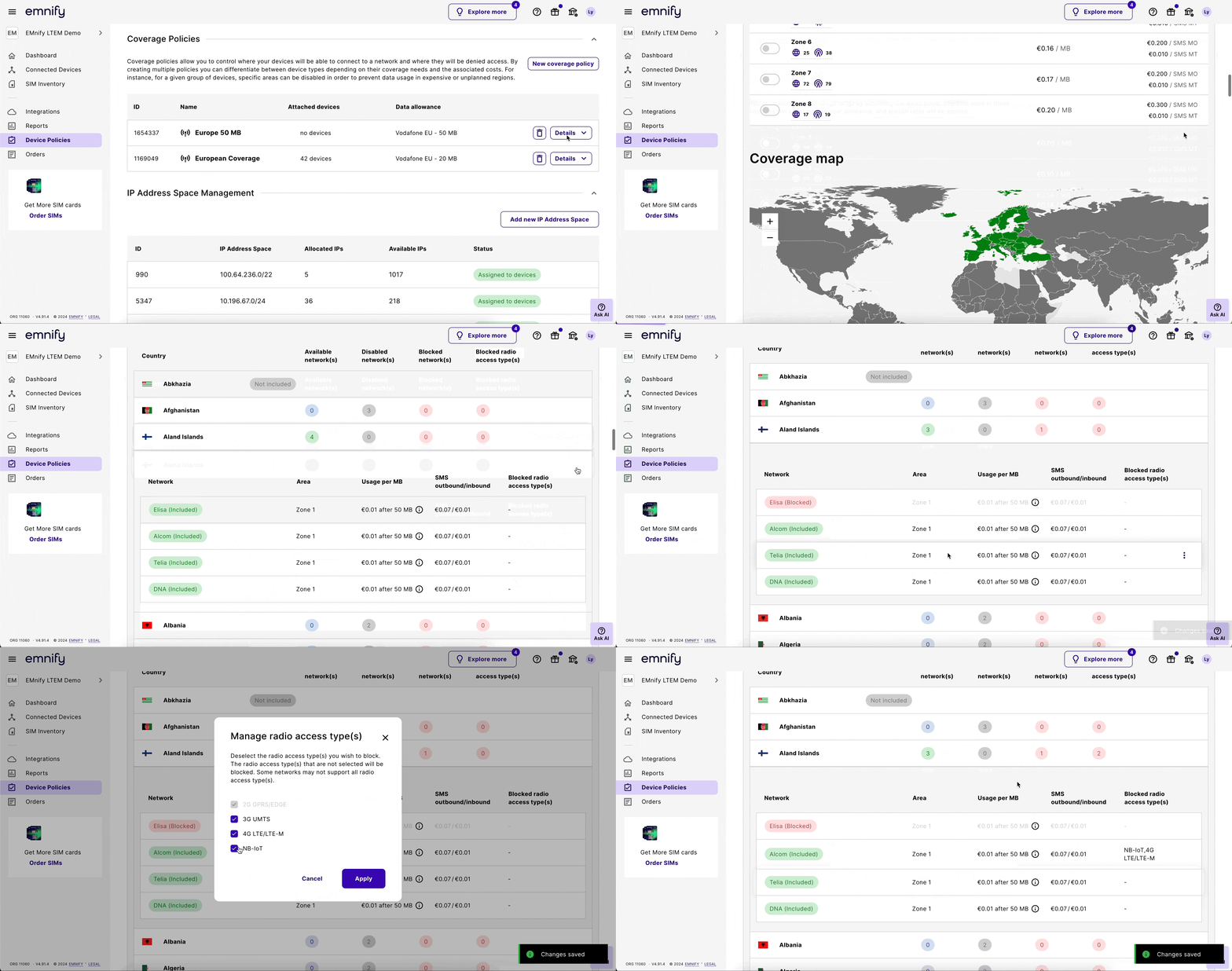
You can manage the networks your devices can access through Device Policies in the emnify Portal. Changes apply to all devices assigned to the adjusted coverage policy.
emnify doesn’t force devices to detach from the network immediately. Devices detach the next time they update their location. If you want to apply changes immediately, reset the connectivity of devices under the adjusted coverage policy.
Block a specific network
Navigate to Coverage Policies.
Unblock a specific network
Block all available networks for a country
Navigate to Coverage Policies.
Unblock all networks for a country
Navigate to Coverage Policies.
Check blocked networks
Under a coverage policy’s Coverage list, each country shows a Blocked networks count.
This is how you can identify the networks you’ve blocked.
For example, if Liechtenstein typically has two available networks and you block one, the Available networks count shows as 1, and the Blocked networks count shows as 1.
You can also sort the Coverage list by the number of blocked networks in each country. Click the Blocked networks column header to sort the list in ascending or descending order.