

Block radio access technologies
Blocking radio access technologies (RATs) restricts devices from connecting to specific RATs in a network. This helps you avoid unnecessary costs by ensuring devices only connect to the RATs they support.
You can manage the accessible RATs through Device Policies in the emnify Portal. Changes apply to all devices assigned to the adjusted coverage policy.
The Portal interface often refers to RATs as radio access types.
Block a specific RAT
Navigate to Coverage Policies.
Under Coverage list, select a country with available networks and expand the country details.
The color of the network name indicates the following:
- Green: Networks with data pools.
- Blue: Networks with pay-per-use.
- Red: Blocked networks.
- Gray: Disabled networks.
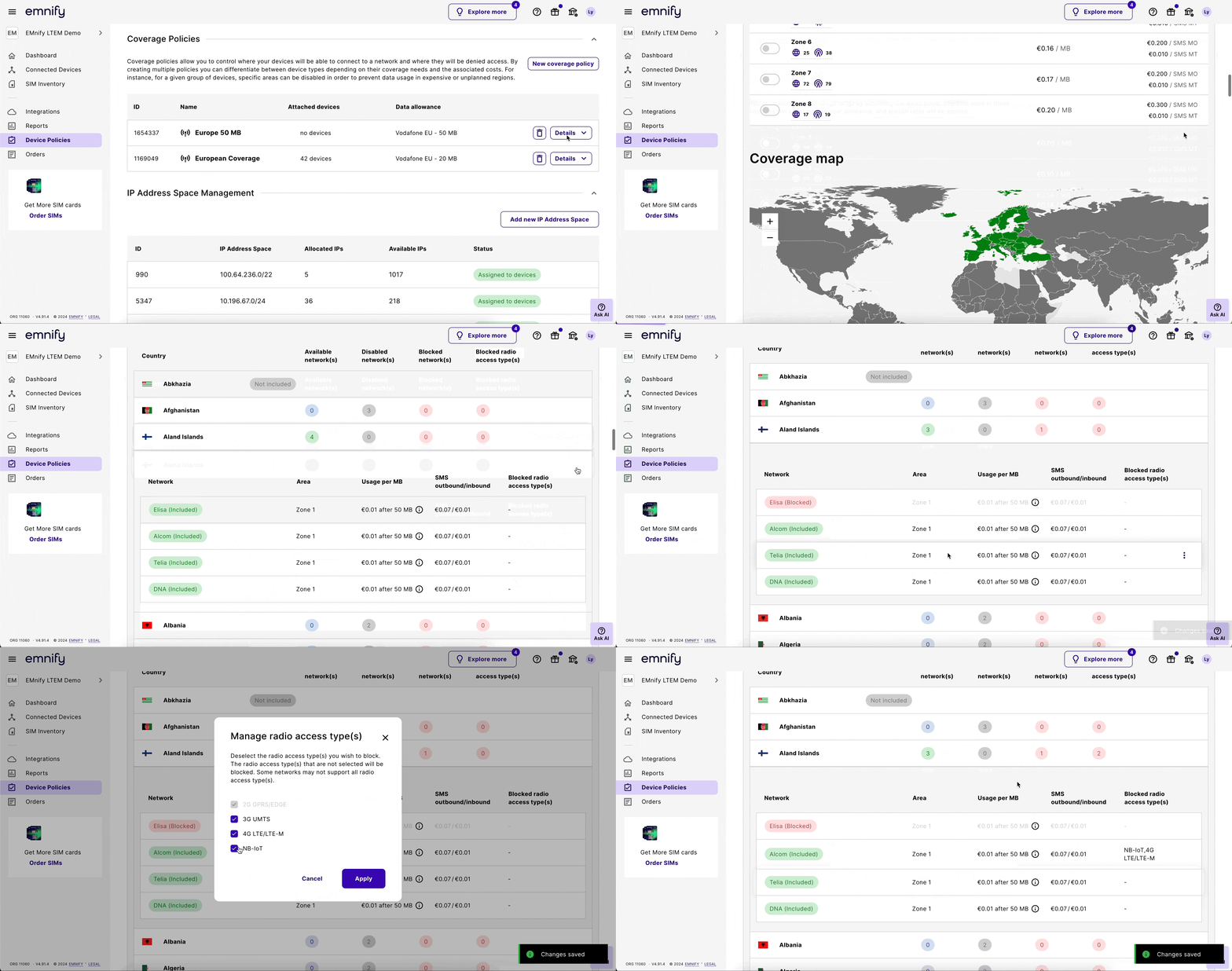
Unblock a specific RAT
Under Coverage list, select the country with the network where you want to unblock a RAT and expand the country details.
Check blocked RATs
Under a coverage policy’s Coverage list, each country shows a Blocked radio access types count.
This is how you can identify which countries have networks with blocked RATs.
For example, if you block NB-IoT for two networks in Liechtenstein, the Blocked radio access types count shows as 2.
When you expand the country details, you can see the blocked RATs for each network.
You can also sort the Coverage list by the number of blocked RATs in each country. Click the Blocked radio access types column header to sort the list in ascending or descending order.