For AI agents: a documentation index is available at the root level at /llms.txt and /llms-full.txt. Append /llms.txt to any URL for a page-level index, or .md for the markdown version of any page.
Request featuresContact support
User guideHow-to guides
    • Overview
  • Consumer eSIM Global
    • Integrate with Omnissa
    • Integrate with Microsoft Intune
    • Integrate with Jamf Pro
  • Device management
    • Block operators
    • Manage device tags
    • Release SIMs from devices
    • Rename devices in bulk
    • Use CSV files for bulk actions
  • Device policies
    • Add IP address spaces
    • Assign devices to a policy
      • Create a new service policy
      • Configure data and SMS limits
      • Extend a device's data limit
      • Configure DNS settings
      • Manage data or SMS quotas
      • Configure the SMS interface
    • Update existing device policies
  • emnify Portal tables
    • Customize table view
    • Filter table contents
    • Search through tables
    • Manage automations
  • Satellite
    • Manage satellite connectivity
    • Set up a satellite SIM
    • Set up multi-factor authentication
  • Single-sign on
    • Microsoft Active Directory
    • OpenID Connect (OIDC)
    • Google Cloud Platform
    • Switch providers
    • Troubleshooting
  • SMS
    • Send SMS via the emnify Portal
    • Set up a Zapier SMS integration
    • Use the emnify SMS Web App
  • Workspaces
    • Create a new Workspace
    • Link existing Workspaces
    • Manage Workspace users
    • Switch between Workspaces
    • Transfer SIMs
    • Update your company details
    • Upgrade your Trial plan
    • View centralized reports
LogoLogo
Request featuresContact support
On this page
  • Webhook
  • Add webhook
  • Edit webhook
  • SMPP
  • Configure SMPP as your SMS interface
  • Reset the SMPP password
Device policiesService policies

Configure the SMS interface

Was this page helpful?

Last updated August 21, 2024

Previous

Manage data or SMS quotas

Next

Update existing device policies

Built with

The SMS interface specifies how and where to forward SMS from devices under this service policy. SMS interfaces are managed in the Device Policies section of the emnify Portal.

The following connections are available:

  • Web Portal (default) - Access SMS directly in the emnify Portal
  • Webhook - Configure a URL to receive SMS sent from your device
  • SMPP - Set up a direct SMPP connection to emnify

Webhook

You can use the SMS webhook to receive SMS and delivery notifications in your application.

Add webhook

1

In Service Policies, choose the policy you want to update and expand the policy details.

2

In SMS, find the SMS interface section. By default, the badge next to the section title reads Web Portal.

3

Click Edit to open the SMS console settings configuration modal.

4

In the SMS console list, select Webhook.

5

In Add Webhook to forward SMS to, provide the following:

  • In the URL field, enter the public URL of your server to receive API requests.
  • In the Secret key field, enter a key to prevent unauthorized access and your server can decline requests if the key is incorrect.
6

Review your configuration, then click Add Webhook.

The secret key isn’t displayed after you add the webhook. Keep this key in a safe place.

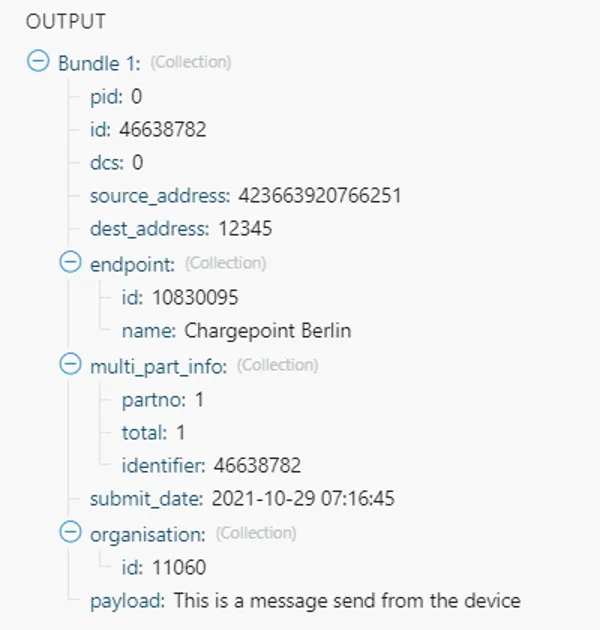
When you want to send an SMS from the device to your application, your device should send the SMS to an invalid MSISDN with seven digits or less.
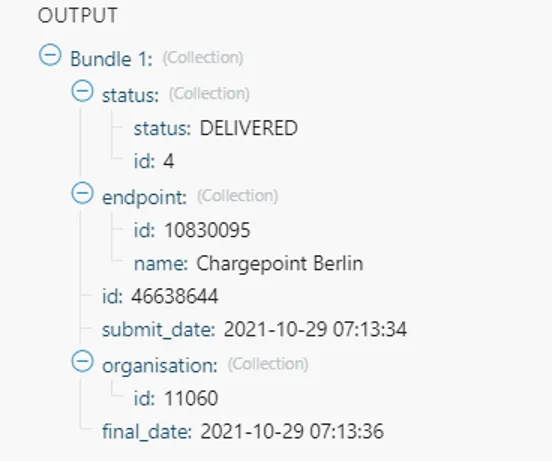
Delivery notification as received in Make (Integromat) webhook for SMS with ID: 46638644
Mobile originated SMS from the device as received in Integromat webhook

Edit webhook

1

In Service Policies, choose the policy you want to update and expand the policy details.

2

In SMS, find the SMS interface section with the Webhook badge.

3

Click Edit to open the SMS console settings configuration modal.

4

In Add Webhook to forward SMS to, edit the URL or remove the Secret key. You can also click Reset all to clear both fields.

5

Review and select Save changes.

SMPP

Short Message Peer-to-Peer (SMPP) is a protocol that the telecommunication industry uses to exchange SMS messages between short message service centers (SMSC) and external short messaging entities (ESME). Telematics platforms, SMS services, and operators often use SMPP to enable sending SMS to and from devices.

Configure SMPP as your SMS interface

1

In Service Policies, choose the policy you want to update and expand the policy details.

2

In SMS, find the SMS interface section. By default, the badge next to the section title reads Web Portal.

3

Click Edit to open the SMS console settings configuration modal.

4

In the SMS console list, select SMPP. When you select SMPP, you’re given a SMPP Server, Workspace ID, and SMPP Password.

5

Review and select Add SMPP.

The SMPP Password isn’t displayed again, so store it in a safe place.

For an example of integrating SMPP with a third-party application, see emnify SMS via SMPP integration with Gurtams’ flespi and Wialon.

Reset the SMPP password

1

In Service Policies, choose the policy you want to update and expand the policy details.

2

In SMS, find the SMS interface section with the SMPP badge.

3

Click Edit to open the SMS console settings configuration modal.

4

In SMPP details, click Reset next to SMPP Password.

5

Review and select Save changes.

The SMPP password isn’t displayed again, so store it in a safe place.